
Your AI agent issues refunds. Can you show why each one was given?
When a seller, a restaurant or your own finance team asks why a refund went out, the agent's own log is the agent's own account. A refund audit checks your recent AI-issued refunds against your written refund rules and tells you which ones fell outside them, and how much money was at issue.
Write to sales@actaseal.com with your company name. We send the NDA; once it is signed, you send the two files.
What the audit finds
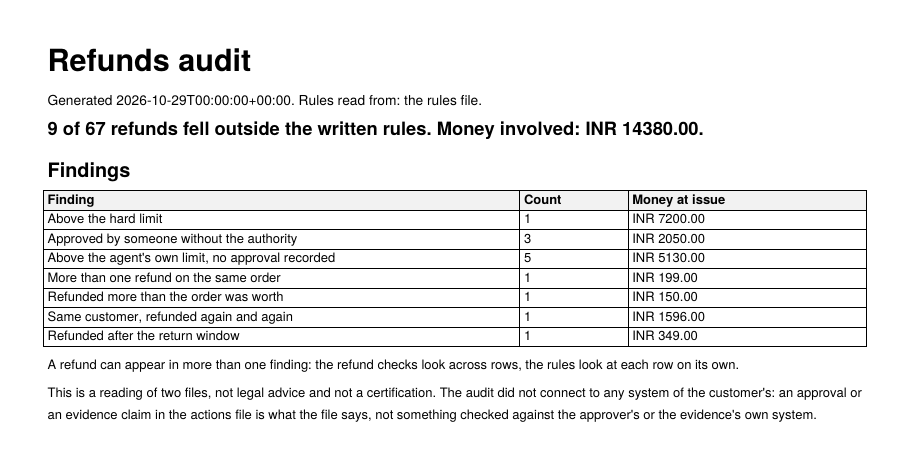
- Refunds above the amount your rules allow the agent to give on its own, with no approval recorded.
- Refunds above your hard limit.
- More than one refund on the same order.
- Refunds that add up to more than the order was worth.
- Customers who received refunds again and again.
- Refunds given after your return window.
Each finding names the refunds involved and the money at issue.
What the report looks like
Page one of a report the audit produced from made-up refunds, so you can see the shape. The whole report lists every refund behind each finding.
What we need from you
Two files. Your export can keep your own column names: we map them, we do not ask you to reformat it.
- An export of at least 50 recent refunds: the amount and currency of each, and whatever you have of the order, its value and date, the customer, and who approved the refund and in what role.
- Your written refund rules: what the agent may refund on its own, above what a person must approve and which role, your hard limit, your currencies and your return window.
What happens to your file
You send it only under a signed NDA. It is used only for the audit, never connected to your systems, and deleted within 30 days of the report being delivered, which we confirm in writing. Your security team can find the rest on the security page.
Questions teams ask
How do we stop our AI support agent from refunding above our policy?
Each refund the agent attempts is checked against your written rules before the money moves. Within your limit it goes ahead; above it, it waits for a person in the role you name; above your hard limit, it is stopped.
Can ActaSeal hold refunds outside the return window or repeat claims?
Yes. A refund on an order older than your window, a second refund on the same order, or a customer claiming again and again waits for a person instead of going out.
When a customer, a seller or finance asks why a refund was paid, what do we show them?
The record of that decision: the amount, the rule it was checked against, who approved it and when. They can check it themselves in a browser, without your account and without trusting us.
How do we find refunds that already went out against our rules?
Start with the refund audit. Send an export of recent refunds and your refund rules; within five working days you get a report of which refunds broke the rules and how much money was at issue.
Does ActaSeal need access to our systems or customer data?
Not for the audit: it runs on an export you send, under NDA, and the file is deleted within 30 days. For a pilot or production, it runs inside your own infrastructure or cloud account, and your data stays there.
Which companies is this for?
D2C and e-commerce brands, quick commerce and fintechs whose AI agents issue refunds, credits or payouts, and the companies that build those agents.
How it runs
- You share an export of recent refunds (order, customer, amount, date) and your refund rules.
- Nothing connects to your systems, and no one needs access to them.
- You get a report within five working days, sealed so that any later change to it shows.
What comes after
- Refund audit: five working days, on an export. Shows what already went out.
- Paid pilot: three weeks, in your test environment. Each refund is checked before the money moves.
- In production: the same checks on every refund your agent issues.
Scope and terms are agreed on a call.
Or write to sales@actaseal.com.